

Monitor submissions
Review transaction status, batch references, and individual sync lines.
Search for NTMP GL Sync. Each row represents a queued Business Central transaction for a facility. Select a row to inspect its lines in the FactBox.
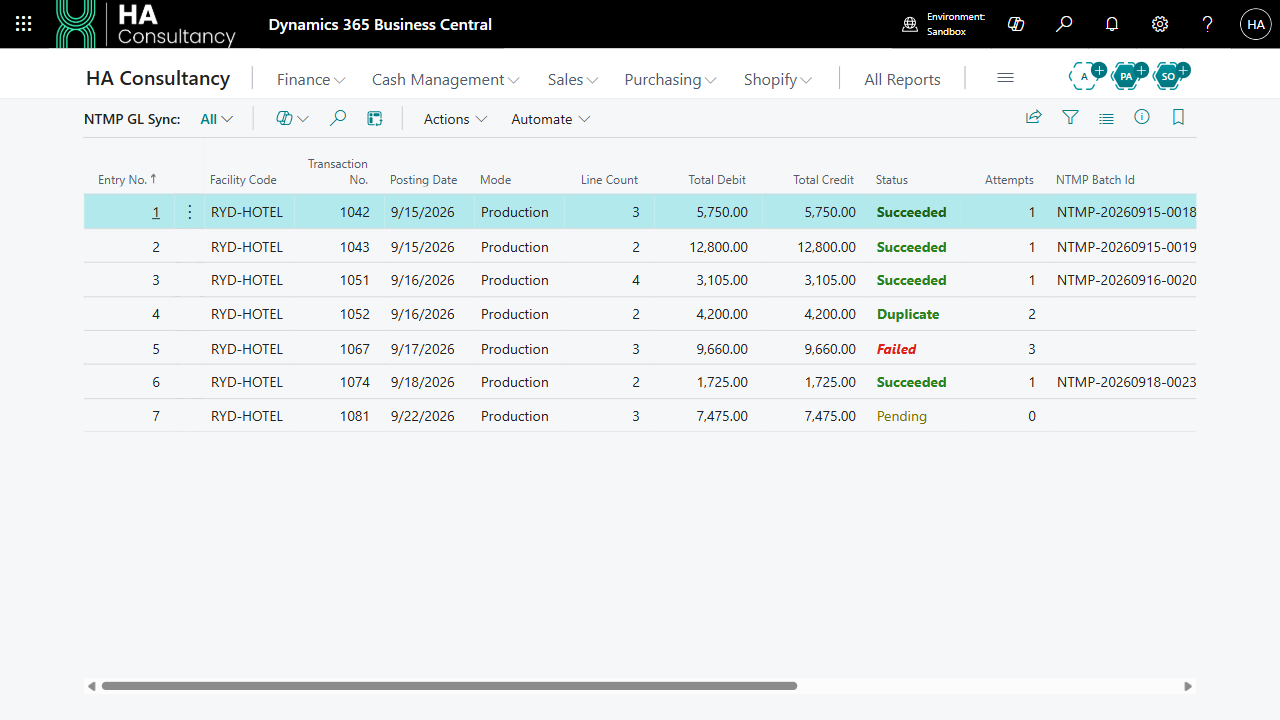
Understand the status
| Status | Meaning | Next step |
|---|---|---|
| Pending | Waiting to be processed. | Wait for the job or use Process Now. |
| Succeeded | The server returned a successful submission response. | Keep the NTMP Batch Id when supplied. |
| Duplicate | NTMP returned its duplicate facility ledger identifier response. | Review the existing submission if reconciliation is needed. |
| Failed | Submission returned an error or an unexpected response. | Review the error, correct the cause, then retry. |
| Sent | A defined status that the current submission routine does not assign. | Do not expect an in-progress Sent row as part of the normal workflow. |
Review the details
- Entry No. identifies the sync record for support and troubleshooting.
- Transaction No. links it to the Business Central transaction.
- Mode shows whether it was queued for Test or Production.
- Line Count, Total Debit, and Total Credit summarize its entries.
- Attempts, Submitted At, Error Code, and Error Message help diagnose submission results.
- NTMP Batch Id contains the returned batch reference when available.
The lines show the original G/L entry number, NTMP account, debit and credit values, transaction date, document reference, ledger identifier, and line result.
Process pending records
Choose Process Now to process all pending records in the company. It is not limited to the currently selected row or the page's filters.
Use Retry on a failed record after correcting the underlying issue. The action changes the header back to Pending; it does not submit immediately or rebuild its lines.
A connection failure can stop the job while the affected row remains Pending. If rows stay pending, also inspect Job Queue Entries and its error log, not only NTMP Sync Errors.
See retry and troubleshooting for recovery steps.