

Map G/L accounts
Connect Business Central accounts to active NTMP ledger accounts and complete mapping.
Finish the chart-of-accounts step in onboarding before mapping. Mappings are stored on the standard Business Central G/L account.
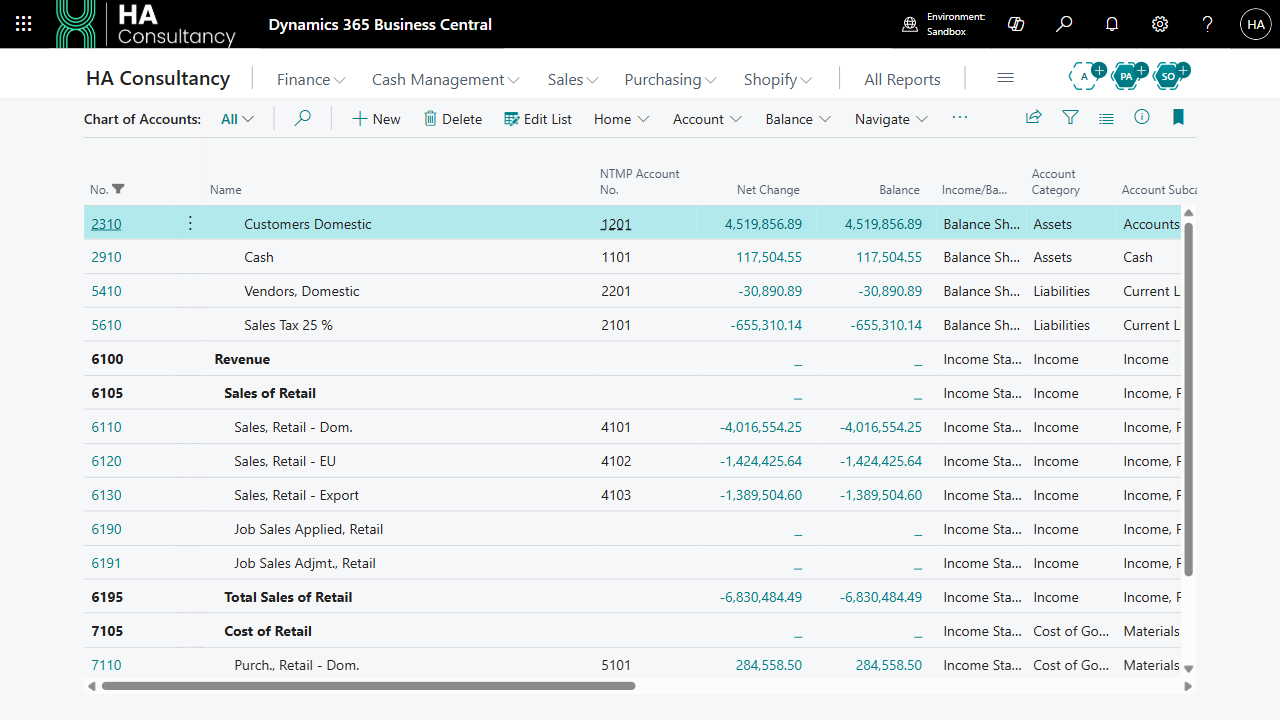
Open Chart of Accounts
Search for Chart of Accounts. You can also edit the mapping on a G/L Account Card.
Choose the NTMP account
In NTMP Account No., select the ministry account that corresponds to the G/L account. The account must have been retrieved from NTMP, be active, and have node type LEDGER.
Group accounts and inactive accounts cannot receive mappings.
Cover the complete transaction
Repeat for every account used in transactions you intend to report, including the balancing accounts. A transaction with both mapped and unmapped accounts will be blocked when posted.
Complete mapping
Choose NTMP Mapping Complete from the actions on Chart of Accounts and select the facility. If active NTMP ledger accounts are uncovered, the action lists their account numbers. Finish those mappings and run the action again.
When coverage is complete, the facility status becomes Mapped - Complete.
Two checks to complete
| Check | Why it matters |
|---|---|
| Every active NTMP ledger account has at least one mapped G/L account. | Required by NTMP Mapping Complete. |
| Every account in a transaction that touches NTMP mapping is mapped. | Required when posting that transaction. |
For example, if a transaction posts to a mapped revenue account and an unmapped receivables account, Business Central stops that posting. Map the appropriate receivables account before posting again.
Changing a mapping
Changes apply to transactions queued afterward. Existing sync lines retain the NTMP account number captured when they were queued; Retry does not rebuild those lines. If an already queued batch contains an incorrect account number, contact support to arrange its correction.
Use one facility per company. The NTMP Account No. field is shared across the company; it does not provide a separate mapping for each facility.